Simple Drums Rock - Drum Set
TPVappsMusic
4.21.03K Reviews
- Version
- 1.9.6
- Installs
- 50.00M
- Age Rating
- Everyone
Screenshots
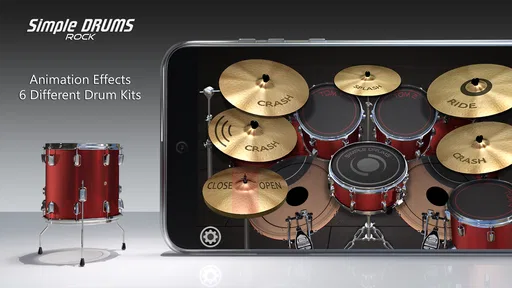
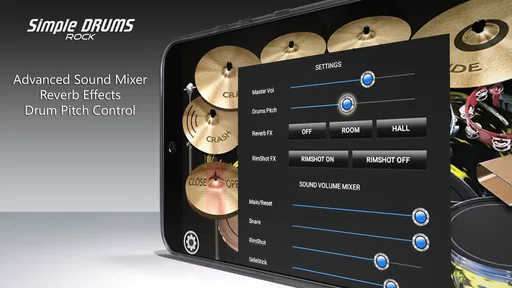
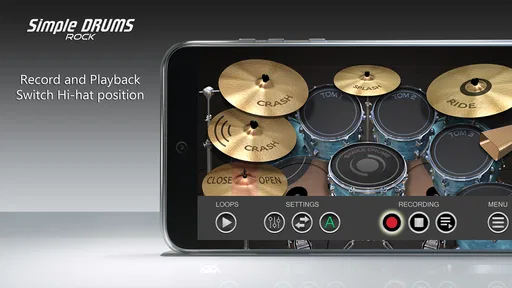
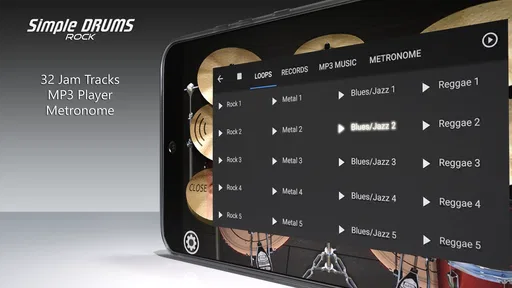
Our Review of Simple Drums Rock - Drum Set
 Analysis by Appyee
I approached Simple Drums Rock - Drum Set as a quick practice tool rather than a full music-production system, and that distinction shaped my opinion from the first session. It is a free music game from TPVapps that turns a phone or tablet into a playable drum kit, with the emphasis on immediate tapping, rhythm practice, and casual fun. The appeal is simple: you can open it, choose a comfortable setup, and start playing without carrying a physical kit or arranging a rehearsal space.
That straightforward purpose is also its strongest quality. I would not recommend it to someone looking for a complete recording studio, detailed drum lessons, or the physical response of acoustic hardware. I would recommend it to a beginner who wants a low-pressure way to explore drum patterns, to a drummer who needs a portable rhythm surface, or to anyone who enjoys music games and wants something more expressive than tapping a fixed sequence.
The game has been available since August 29, 2015, and its continued reach is easy to understand. It has passed 50 million installs and holds a 4.2 average from roughly 116 thousand ratings, which places it among the more established mobile drum simulators. It is rated Everyone, so it is suitable for a broad audience, although younger players will still benefit from sensible volume levels and occasional screen breaks.
Why the playable drum layout matters
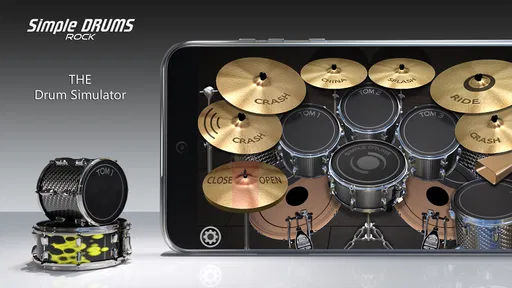
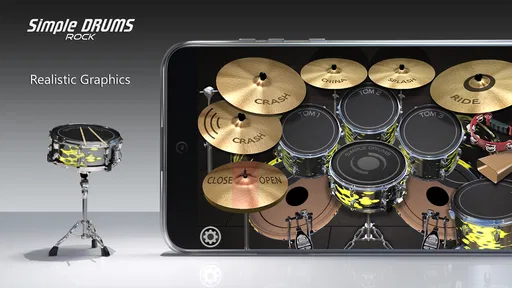
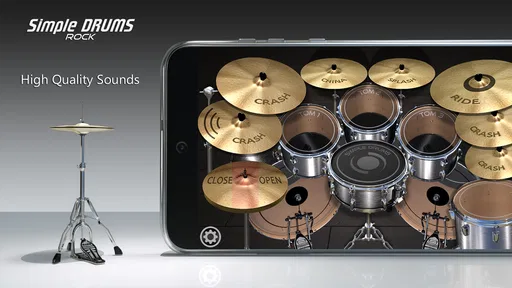
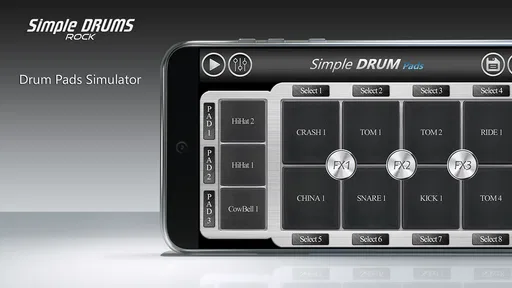
The central capability is the conversion of a touchscreen into a virtual drum set. That sounds familiar, but the important effect is how quickly it removes the distance between an idea and a beat. I can think of a rhythm, place my fingers on the visible pads, and test it immediately. There is no need to connect equipment, tune anything, or wait for a computer session to load.
For me, the most useful part is not pretending that the phone is identical to a real kit. It is using the screen as a compact rhythm sketchpad. A basic kick-and-snare pattern, a repeated hi-hat pulse, or a short fill can be tried in seconds. That makes the app useful during small gaps in the day, especially when I want to keep a beat in mind without making a loud noise in the room.
The on-screen layout also changes the way I think about drumming. On a physical kit, the position and rebound of each surface are part of the experience. Here, the main concern becomes finger placement and timing. That makes the game approachable, but it also means the best results come from treating it as a digital instrument with its own limitations rather than as a perfect substitute for drum hardware.
The real strength is instant rhythm access, not hardware imitation. That difference is worth understanding before downloading it. If your goal is to practice coordination, experiment with patterns, or have a musical distraction, the design makes sense. If your goal is to develop the exact foot control, stick rebound, posture, and dynamic response needed for a physical kit, the screen can only support part of that journey.
How I use the virtual kit in practice
I get better results when I begin with one simple pattern instead of trying to hit every visible surface at once. I start by establishing a steady pulse with one hand, then add the backbeat, and only afterward introduce extra taps. This approach makes the app feel less like random screen tapping and more like a compact coordination exercise.
A useful routine is to play a short pattern repeatedly, then deliberately remove one element. For example, I might keep the main pulse and omit the accent for a few rounds, then bring it back. That small change reveals whether my timing depends on visual anticipation or whether I am actually hearing the space between hits. It is a practical way to use the game for musical awareness rather than simply chasing speed.
I also recommend holding the device in a stable position before playing. A phone that shifts across a table can make accurate taps frustrating, particularly when two fingers need to land close together. A case with a firm edge or a non-slip surface helps more than people might expect. This is not a special feature of the software, but it is an important part of making the touchscreen layout usable.
Headphones can make practice more focused, especially in a shared room, but they do not change the physical limitation of the screen. The sound gives feedback about whether a hit registered, while the visual layout helps me aim. I pay more attention to the audio after the first few minutes because watching every tap can encourage stiff, overly deliberate movements.
One non-obvious benefit is that the compact format encourages short sessions. With a physical kit, setting up can become a reason not to practice. With this game, I can use a few spare minutes to repeat a rhythm or test an idea. Short sessions are not a replacement for structured study, but they are a realistic way to keep timing active between lessons or rehearsals.
A realistic everyday use case
Imagine that I am waiting for a train or taking a quiet break before an appointment. I have a rhythm from a song stuck in my head, but I do not want to drum on a table and bother people nearby. I can open the game, tap the main pulse softly, and work out whether the pattern feels better with a stronger backbeat or a small fill at the end of the phrase. The exercise takes only a few minutes, yet it turns idle time into useful musical thinking.
Another practical situation is songwriting away from a desk. I may have a guitar or keyboard idea but no drum machine nearby. The virtual kit can provide a rough rhythmic outline while I test the shape of a verse or chorus. I would not treat the result as a finished production, but it can answer an important early question: does the musical idea need a straight pulse, a more active pattern, or a pause?
For a parent or teacher, the game can also be an approachable introduction to the idea that rhythm is built from layers. A child can begin with a repeated tap, add another sound, and hear how the combination changes the feel. Because the content rating is Everyone, it is a reasonable option for broad family use, provided the device is handled responsibly and the volume is kept comfortable.
For an experienced drummer, the everyday use is different. I see it as a memory aid and a rhythm notebook, not a replacement for a practice pad. It can help preserve a pattern while traveling or provide a quick way to demonstrate an idea to someone who does not have a kit available. Its value is convenience, not professional realism.
Where it differs from usual alternatives
Compared with a physical drum kit, this game wins on portability, noise control, and ease of access. A real kit offers far better rebound, separation, dynamics, and body coordination, but it also needs space and produces sound that may not suit every household. The touchscreen version is much easier to pick up casually, though the trade is a flatter playing response and less natural movement.
Compared with a drum machine, the game feels more direct because I am manually triggering the sounds instead of programming a sequence first. That makes it better for spontaneous tapping and hand coordination. A drum machine is usually the stronger choice when I need repeatable arrangements, editing, layered production, or a polished backing track.
Compared with rhythm games built around fixed notes or songs, this title gives me more freedom to create my own pattern. That freedom is useful for experimentation, but it also means the experience may feel less guided. Someone who wants clear levels, a campaign, or constant goals may prefer a conventional rhythm game with structured challenges.
Compared with educational drum apps, it is more immediately playful than instructional. I can practice timing concepts with it, but I should not expect a complete curriculum, detailed technique correction, or a teacher-like progression. A dedicated learning platform is a better investment for someone who wants formal lessons and measurable development.
The tradeoffs I noticed after longer use
The first limitation is the touchscreen itself. Even when the layout is easy to understand, fingers do not receive the same tactile information as sticks meeting drumheads. I sometimes rely too heavily on sight, and that can make the rhythm less natural. The app is therefore strongest for basic coordination and idea generation, while physical technique still requires physical practice.
Screen size matters as well. A larger tablet gives the virtual kit more breathing room and makes two-handed playing less cramped. A smaller phone is more convenient, but it demands greater finger accuracy. I would choose the largest comfortable screen available for deliberate practice and keep the phone version for quick sketches or casual play.
There is also a difference between hearing a pattern and producing a convincing performance. The app can help me place hits in time, but it does not automatically teach dynamics, ghost notes, stick control, or the subtle push and pull that makes a drummer sound experienced. I have to bring those musical decisions myself, and some of them are difficult to express through a flat glass surface.
The free price makes experimentation easy, but optional in-app purchases range from $0.99 to $1.49 per item. I would begin with the free experience and decide whether any paid item genuinely improves my personal use. That approach avoids spending simply because the app is enjoyable for a few minutes. The purchase range is modest, but the right value depends on whether I use the simulator regularly or only occasionally.
The current version is 1.9.6 and requires Android 6.0 or later. That makes the compatibility question fairly simple for many Android users, but anyone with an older device should check the operating system before planning around it. I also keep expectations realistic about performance: a music game can be playable on a suitable device without offering the same responsiveness as dedicated hardware with physical triggers.
Who benefits most from this particular design
Beginners gain the most because the entry barrier is so low. I can explore basic drum roles without first learning how to position a kit, hold sticks, or coordinate a pedal. The game gives a newcomer an immediate sense of whether rhythmic tapping is enjoyable, which can be a useful first step before buying equipment or booking lessons.
Casual music fans are another strong audience. If I enjoy beats but do not want a demanding game, this offers a relaxed way to interact with rhythm. It works well as a short break because I can stop after a few minutes without losing a long progression or leaving a complicated project unfinished.
Songwriters and instrumentalists can use it as a portable idea tool. The important workflow is to treat each session as a sketch: find the pulse, test the accents, remember or record the musical idea elsewhere, and move on to the next part of the composition. It is especially useful when the alternative is losing the rhythm entirely while searching for a more elaborate app.
Young users can enjoy the immediacy, but adults should guide expectations. It is suitable for playful exploration, not a substitute for supervised instruction when proper technique matters. Likewise, advanced drummers should skip it if they need realistic rebound, accurate footwork, or nuanced recording control. A physical practice pad, electronic kit, or production-focused application will serve those needs better.
I would also skip it if my main goal were song-based competition. The appeal here is the virtual kit itself, not a promise of a structured challenge ladder. Likewise, people who want to build complete tracks should choose a workstation or drum sequencer. This game earns its place when the question is, “Can I play with a beat right now?” rather than, “Can I finish a professional arrangement?”
My final take after using it as a rhythm tool
What I like most is the honesty of the concept. Simple Drums Rock - Drum Set does not need to be a studio, a lesson plan, and a competitive game at the same time. Its value comes from making drum-style interaction available whenever I have a compatible Android device and a few spare minutes. The design is easy to approach, and the free entry point makes it comfortable to test without a major commitment.
My recommendation comes with one clear condition: use it for what a touchscreen does well. Build a pulse, try a fill, explore coordination, entertain yourself, or preserve a rhythmic idea while away from your instruments. Do not judge it by the standards of an acoustic kit or a full music-production application, because those tools solve different problems.
TPVapps has made a practical little music game for people who want immediate access rather than a complicated setup. With a 4.2 average and a large established audience, it has clearly found users who appreciate that convenience. I would install it for casual practice, songwriting sketches, and quiet rhythm play. I would pair it with real instruction or physical equipment if my ambitions moved toward serious drumming.
In the end, the game is most convincing when I use it as a pocket-sized rhythm surface. It turns waiting time into experimentation, gives beginners a friendly first contact with drum patterns, and offers experienced players a lightweight way to keep ideas moving. That is a narrower promise than being a complete drum simulator, but it is also why the app can be genuinely useful.
Verdict
Strengths of Simple Drums Rock - Drum Set
- Responsive touch controls make beats feel natural and easy to play.
- Multiple drum kits offer different sounds for varied musical styles.
- Useful metronome helps improve timing and rhythm practice.
- Works well for quick practice sessions without needing extra equipment.
- Simple layout lets beginners start playing with almost no learning curve.
Limitations of Simple Drums Rock - Drum Set
- Some advanced features may require in-app purchases.
- Small screens can make accurate hits difficult during fast patterns.
- Sound quality depends heavily on your device’s speakers or headphones.
- Limited recording and editing tools may disappoint serious musicians.
- Ads can interrupt the experience in the free version.
Other Releases by TPVapps
View All
Drums Maker: Drum simulator
Music4.3
Similar Picks in This Category
View All
Tiles Hop Music & Ball Game
AMANOTES PTE. LTD.4.3

Magic Tiles 3™ - Piano Game
AMANOTES PTE. LTD.4.6

Real Piano
Bilkon3.7

Piano Game: Classic Music Song
Dream Tiles Piano Game Studio4.0

Smash Colors: Music Ball Rush
BADSNOWBALL HONGKONG LIMITED4.2

Piano Music Go-EDM Piano Games
Joy Journey Music Games4.5
Frequently Asked Questions
What is Simple Drums Rock - Drum Set?
Simple Drums Rock - Drum Set is a virtual drumming app that turns your Android or iOS device into a playable drum kit. It provides touch-sensitive drums and cymbals arranged on screen, allowing you to tap out rhythms, practice beats, or play along with music. The app is designed for casual players, beginners, and anyone who wants a portable drumming experience without owning a physical kit.
Is Simple Drums Rock - Drum Set suitable for beginners?
Yes, the app is generally suitable for beginners because its controls are straightforward and easy to understand. You simply tap the on-screen drums and cymbals to produce different sounds, making it possible to experiment with basic rhythms immediately. However, users who want structured lessons, detailed notation, or progressive training exercises may find that the app focuses more on free playing than formal drum instruction.
Can I use Simple Drums Rock - Drum Set with songs or headphones?
The app is intended to make drumming more entertaining by letting users play along with music, depending on the features available in the installed version and device. Headphones or external speakers can improve the experience, especially when you want to hear the drum sounds clearly. Using headphones is also helpful in shared spaces, although audio latency may vary between devices and Bluetooth accessories.
Does Simple Drums Rock - Drum Set work offline?
The core drumming experience can typically be used without a constant internet connection once the application has been installed. This makes it convenient for practicing during travel or in places with limited connectivity. Nevertheless, internet access may still be required for downloading the app, receiving updates, viewing advertisements, accessing optional content, or using any online-related features included in the current release.
Is Simple Drums Rock - Drum Set free to download?
Simple Drums Rock - Drum Set may be available as a free download, but the exact experience can depend on the platform and version you install. Free editions may include advertisements, optional purchases, or limitations on certain sounds and features. Before downloading, check the official Google Play or App Store listing for the current price, in-app purchase details, supported devices, permissions, and the latest user reviews.
Play our best games!


